 LevelVan
 Which wheel. How high.
LevelVan turns your iPhone’s tilt into the height that is missing under the wheel, and names the stage of your levelling ramps that covers it.
Coming soon to the App Store. For iPhone and iPad, iOS 17.6 or newer. Free to use, Pro as a one-time purchase. No account, no subscription, no ads.
Try it: the same formula runs here as in the app
Raise rear left8.0 cmRamp stage 10
Drag the sliders and switch vehicles: the same tilt yields more centimetres on a longer wheelbase. That is exactly why the app asks for the dimensions.
Why centimetres
A degree is not a height
A spirit level shows you the angle. What you want to know is the height under the wheel, and that depends on how long your vehicle is. At the same tilt of one degree:
- 1.0° of tilt Caravan, 2.50 m 4.4 cm
- 1.0° of tilt Panel van, 3.45 m 6.0 cm
- 1.0° of tilt Coachbuilt, 4.25 m 7.4 cm
An instruction, not a reading
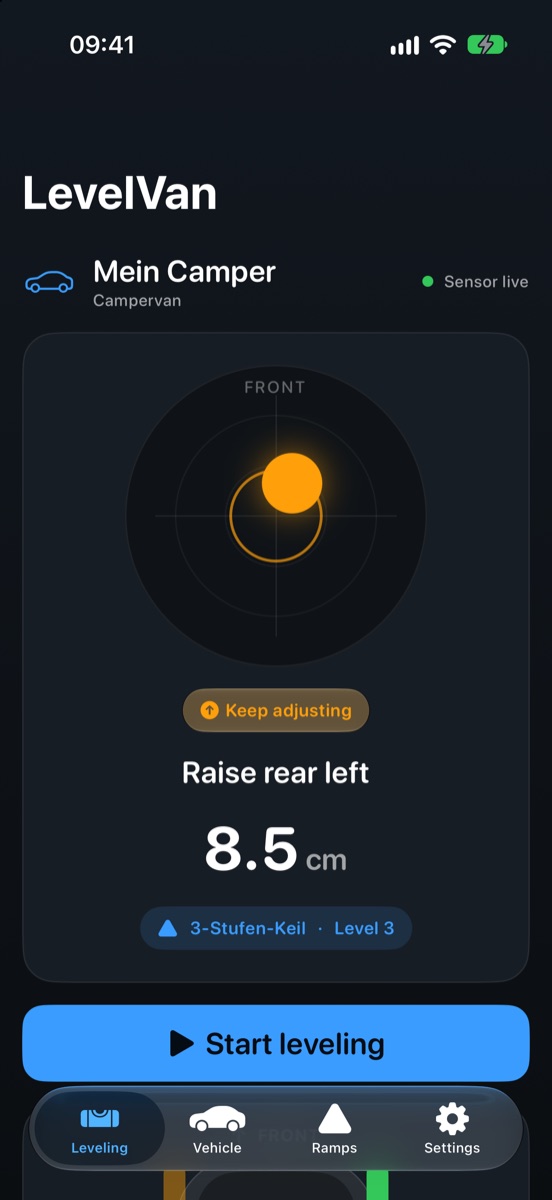
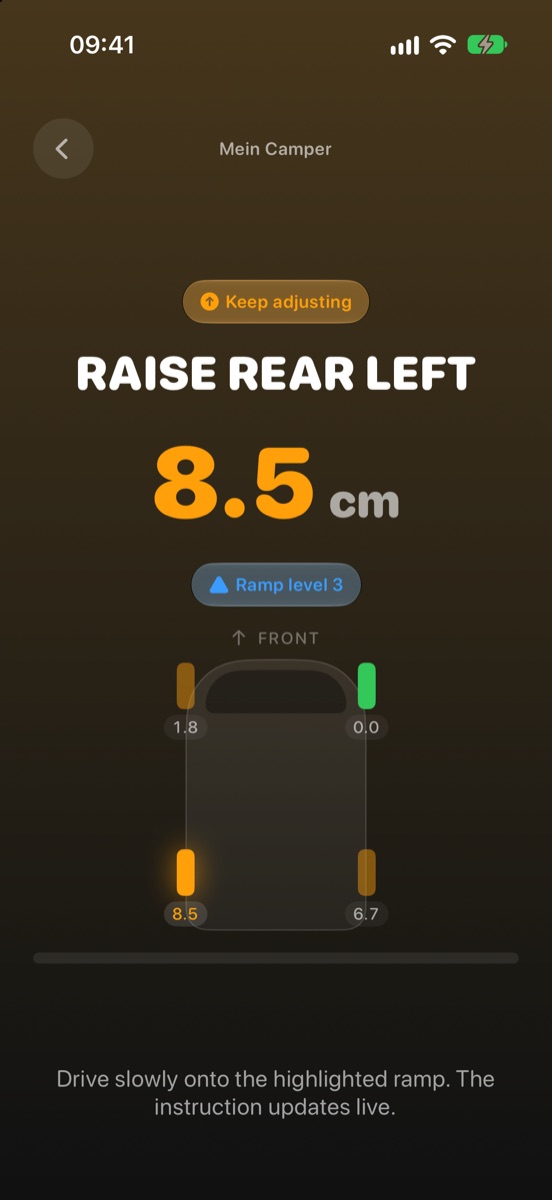
Which wheel, how many centimetres, which ramp stage. An angle would still have to be converted for your vehicle. That is exactly what LevelVan takes off your hands, because it knows your wheelbase and track width.
Your ramps, your stages
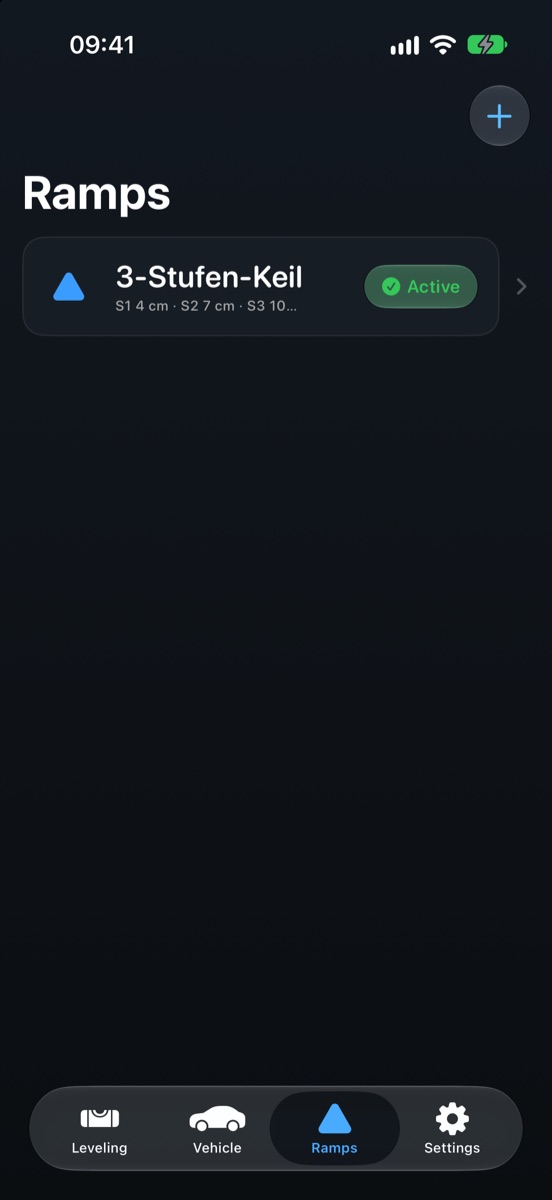
You enter the real step heights of your levelling ramps. LevelVan then names the stage that covers the lift, instead of a number you would have to translate to your own ramps.
Calibrate without buttons
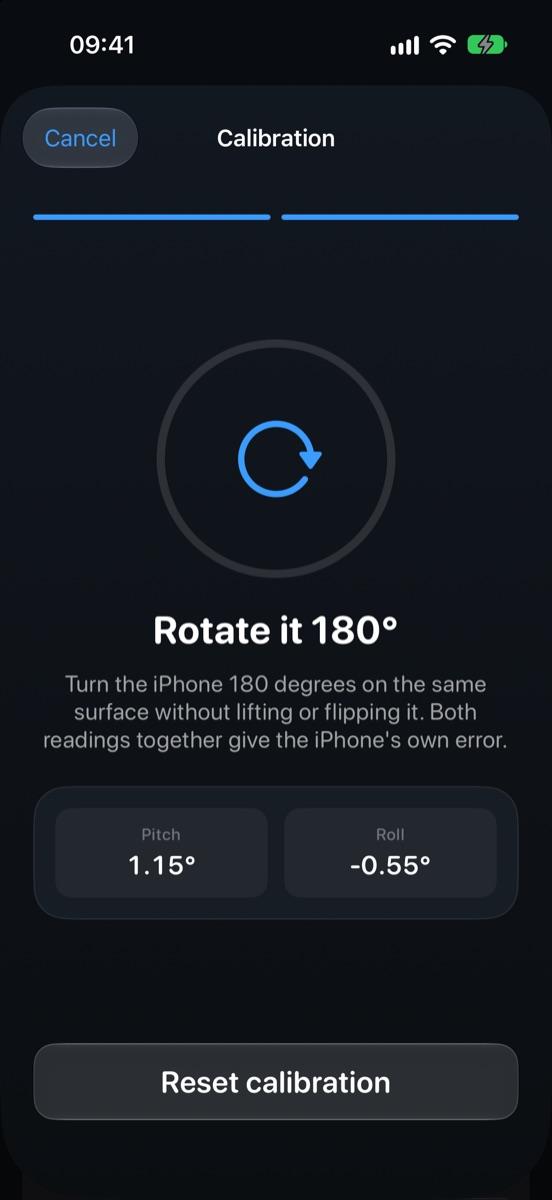
Place it, turn it 180 degrees, done. The app takes the samples itself as soon as the device rests still. Your iPhone’s sensor error and the camera bump are both cancelled out. If the measured error is implausible, LevelVan says so instead of storing it.
Readable from two metres
Colour, word and number all say the same thing. The screen stays awake while you manoeuvre and the instruction updates live, so your eyes can stay on the mirror.
Voice guidance
The instruction is spoken, in English or German. It speaks only on a real change of state, not on every sensor reading, otherwise the app would talk non-stop. Part of Pro.
Both devices, both languages
iPhone and iPad, English and German, light and dark. The iPad gets a sidebar; in landscape the instruction and the vehicle sit side by side.
From the app
Four screens, that’s it
Reading it from two metres matters more than a long feature list. So the app looks like this:
Price
Buy once. Stays yours.
No subscription. You need LevelVan a few weekends a year. Paying monthly for that would be an imposition.
Free
€0
- Levelling with instruction and centimetres
- Recommended ramp stage
- Two-point calibration
- One vehicle and one ramp profile
- English and German, light and dark
LevelVan Pro
€9.99 once
- Unlimited vehicles
- Unlimited ramp profiles
- Voice guidance while manoeuvring
- Everything added to Pro later
Price for Germany and Austria; Apple converts for other countries. Levelling itself is never locked, not even after a trial period, because there is none.
Support
Help and contact
A question, a bug, a missing detail? Write it here. From the app it works the same way: Settings, Send feedback. Both end up in the same place, without you needing a mail client. We answer in English and German, usually within two working days.
Why do I have to enter wheelbase and track width?
Because an angle only becomes a height with the vehicle’s dimensions. One degree of tilt is 4.4 cm on a caravan with a 2.50 m wheelbase and 7.4 cm on a coachbuilt with 4.25 m. Without them LevelVan could only show degrees, which is exactly what the app is meant to avoid. Measure wheel centre to wheel centre.
Where do I put the iPhone?
Flat on a solid surface inside the vehicle, display up, top edge pointing toward the front. If your resting place is sloped, you can store that as a mount offset on the vehicle, and LevelVan cancels the slope out. That does assume the vehicle really is level at that moment, checked with a spirit level and not by eye.
How do I calibrate properly?
Put the device on a solid, unmoving surface. It does not have to be level, calibration cancels the surface out. Wait until the app has taken the first sample, turn the device 180 degrees and put it back in the same spot. The second sample arrives on its own again. If LevelVan then reports an implausible value, the device was not in the same spot, or the surface gave way.
What can I do for free?
Levelling itself, completely: bubble, instruction, centimetres, ramp stage and calibration. Plus one vehicle and one ramp profile. None of it is a trial that runs out.
Is Pro a subscription?
No. A one-time purchase, no renewal, nothing to cancel. What was sold with Pro stays included permanently.
I bought Pro and reinstalled the app.
Settings, Restore purchases. The purchase belongs to your Apple Account, not to the device. Make sure you are signed in with the same account you bought with.
Do I need an internet connection?
Not for levelling. The maths runs on the device and your vehicles and ramps are stored locally. With no signal on the pitch, everything that matters still works.
Does LevelVan replace a spirit level?
Not for safety-critical work. LevelVan levels a parked camper, nothing more. When driving onto ramps, what you see always wins over the display.
Which iOS version do I need? Is there an Android version?
iOS 17.6 or newer, iPhone and iPad. Android is not currently planned.
What happens to my data?
Vehicles, ramps and calibration stay on the device. The only things transmitted are what you trigger yourself: feedback you write and send, and anonymous usage statistics, but only if you agree at first launch. They are off by default.
Privacy
Levelling works offline.
No account, no obligation to connect, no statistics without your consent:
- Levelling works offlineVehicles, ramp profiles and calibration are stored locally. The whole calculation runs on the device.
- No account, no sign-upYou enter neither an e-mail address nor a password, so there is nothing that could leak.
- Usage statistics are off by defaultAt the end of setup LevelVan asks once whether it may count which screens are used. Both answers carry the same weight, nothing is preselected, and the app works completely if you decline. Without consent nothing is transmitted.
- Screens are counted, not youIf you agree, an event name from a fixed list, app and iOS version, language identifier and a session identifier go to a self-hosted Aptabase server. No names, no measurements, no location, no device model. The session identifier is replaced after a period of inactivity and outlives nothing.
- No ads, no third-party trackingThe app does not follow you across apps or websites and sets no identifier that outlives the session. That is why no App Tracking Transparency prompt appears.
- Feedback goes to a serviceIf you write feedback, the message goes to Tellstack, along with app version, iOS version, device model and language, and your e-mail address only if you enter one. Unless you write and send something yourself, nothing is transmitted.
- The form on this page tooYour text, the kind you chose and an optional e-mail address go to our server and from there to Tellstack. Your browser never connects to Tellstack, so nothing is loaded from it either. As long as you send nothing, the text does not leave your device.
Buying Pro runs through Apple; we see neither your name nor payment details, only whether a valid purchase exists. This website also sets no cookies, loads no fonts or scripts from third parties, and does not measure you. Tellstack is our processor for feedback; the legal basis is your consent, because you submit the form yourself.
Legal bases
Usage statistics run on your consent (Art. 6(1)(a) GDPR together with Art. 5(3) of the ePrivacy Directive) and can be withdrawn at any time in Settings, with effect for the future. You send feedback deliberately; that is a consent too. Please do not put credentials, payment details or other people’s data into the text.
Controller and your rights
The controller under the GDPR is Gerhard Kanzler, Ahornweg 1, 83410 Laufen, Germany, levelvan@rz-solutions.dev. The full details are in the imprint. You have the right of access, rectification, erasure, restriction of processing, data portability and objection, and the right to lodge a complaint with a supervisory authority. Since the app has no accounts, this concerns feedback messages in practice; an informal e-mail is enough. The usage statistics contain nothing that could be attributed to you, so access to them is technically impossible.
This website runs on a server of Hetzner Online GmbH (Industriestr. 25, 91710 Gunzenhausen, Germany) in a data centre in Falkenstein, Germany. When you open it, the server processes technically necessary access data (IP address, time, page requested, browser identification) in order to deliver the page and keep it secure; the legal basis is the legitimate interest in secure operation (Art. 6(1)(f) GDPR). These log entries are deleted automatically after a short time.